GyreDownload

Code to production and back. Without leaving your editor.

Gyre follows every change from your first keystroke through CI, review and deploys to the errors it causes in production, on one timeline. It works with the providers your team already uses.

Free for individuals. macOS, Windows and Linux.

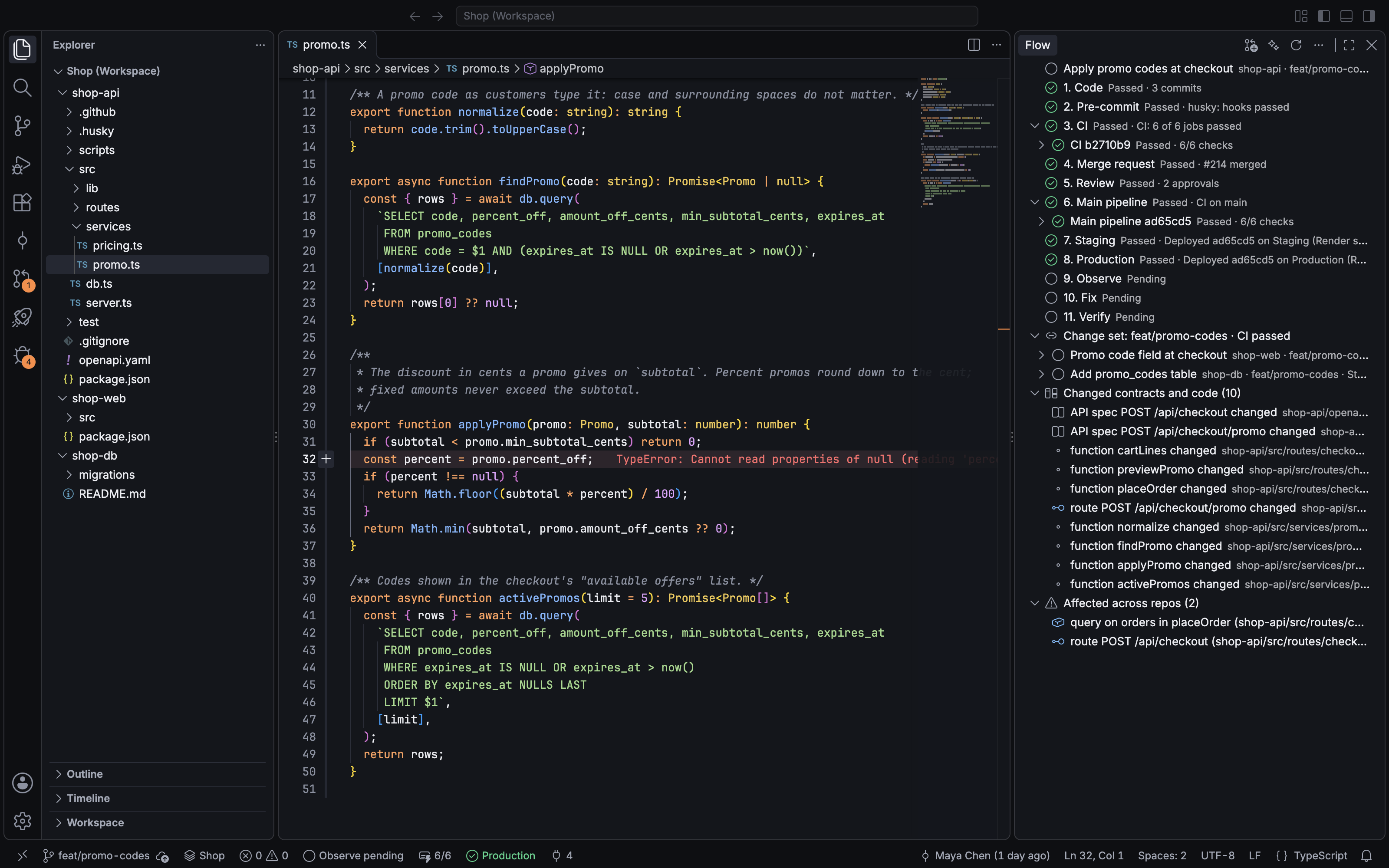
The Gyre IDE: code editor with the timeline for the current change and the Flow panel

Every change gets one timeline.

Eleven stages, from the first commit to the error rate after the fix. Each stage uses the provider you already have, and everything lands in the same place.

fix/cart-total-roundingshop-api 4f2c9a1
  1. 01Code3 commitsAnthropic, OpenAI, Claude Code
  2. 02Pre-commit6 hookspre-commit, Husky, Lefthook
  3. 03Push and CI2m 14sGitHub Actions, GitLab CI
  4. 04Merge request#482GitHub, GitLab
  5. 05ReviewApprovedGitHub, GitLab
  6. 06Main pipeline1m 52sGitHub Actions, GitLab CI
  7. 07StagingHealthyRender, Helm, Argo CD
  8. 08ProductionShippedRender, Helm, Argo CD
  9. 09ObserveErrorsSentry, Platform logs
  10. 10Fix#483Your own model
  11. 11VerifyResolvedSentry, Platform logs

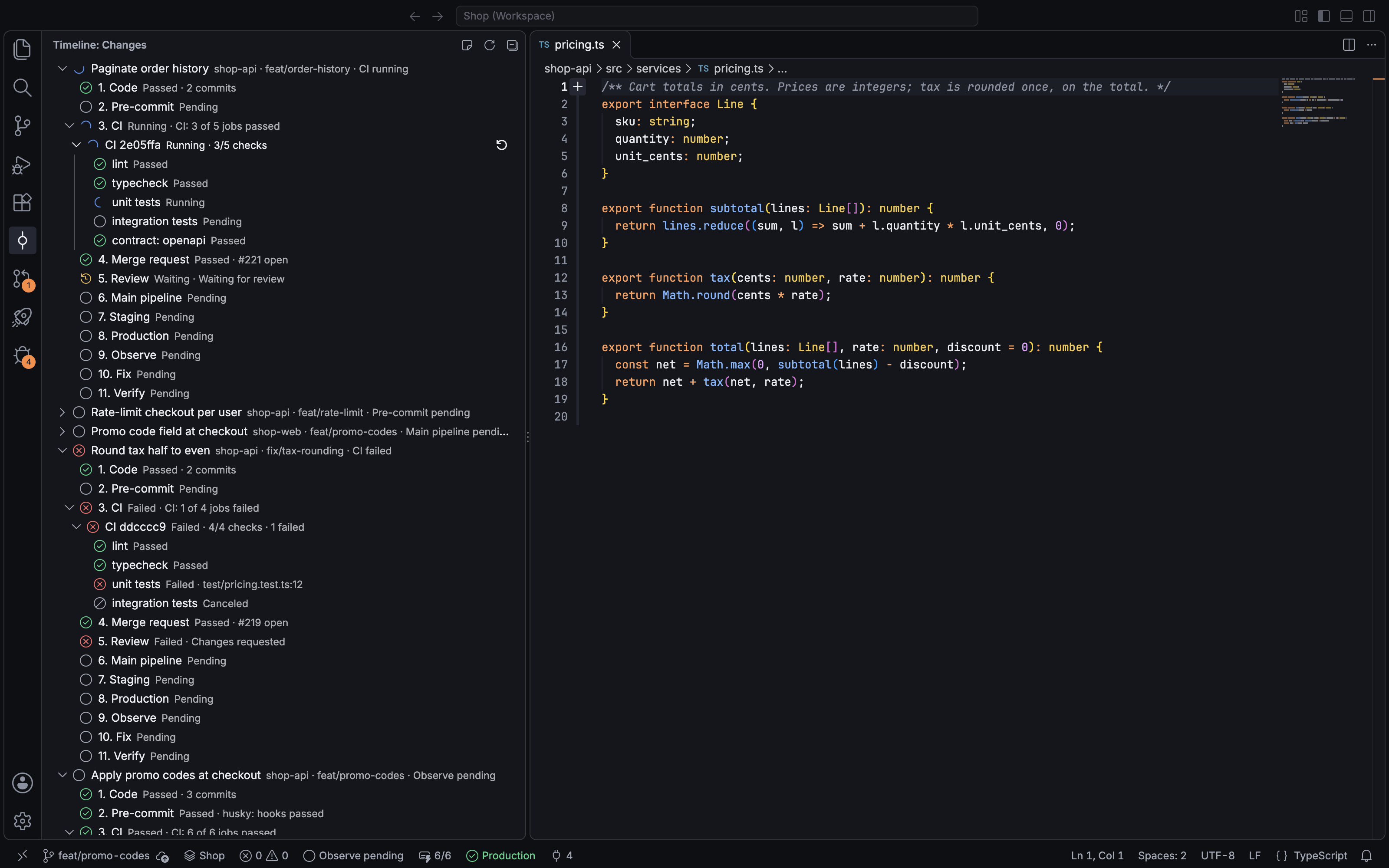
Your branch becomes a change with one timeline. Hooks, pipelines and the merge request land on it as they happen, with failures on the failing line.

The Gyre timeline for a change: commits, pre-commit hooks, CI and the merge request

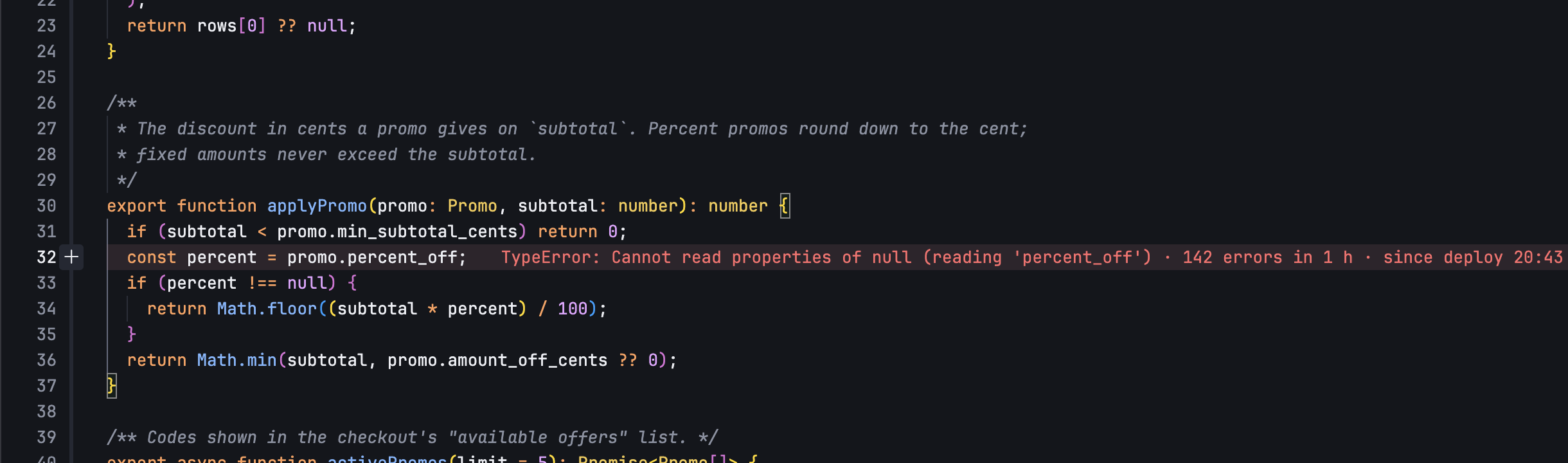
Production errors, on the line that threw them.

Sentry or plain platform logs, mapped to the deployed commit and labeled with the deploy that started them. Ask your own model for the root cause; the fix opens as a review.

  • Traces from Node, Python, Go, Java, Kotlin and Rust logs, with no setup
  • Traced across repos, from a frontend error to the backend deploy
  • Verify compares error counts after the fix ships, then resolves or reopens
Error lens in the editor: 142 errors in 1 hour since the latest deploy, from platform logs

Several repos. One system.

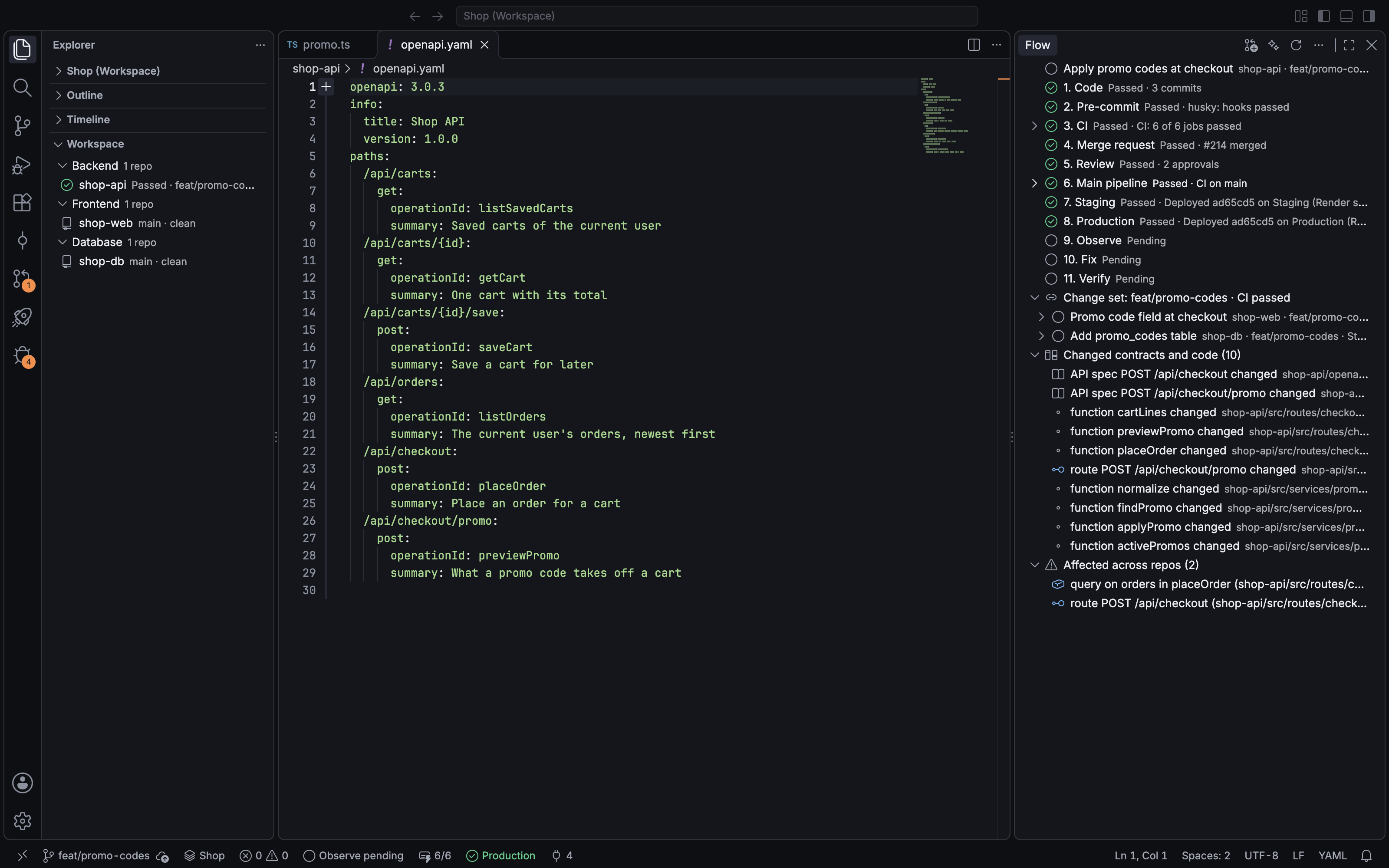
List your repos and the contracts between them in gyre.workspace.toml. Rename a column and see every query, route and component it touches, with file and line.

  • Change sets: one change across repos, reviewed and merged in order
  • Deploys run database, then backend, then frontend, and roll back in reverse
The Flow panel for a change set across shop-api, shop-web and shop-db: changed contracts and code, and what they affect in other repos

Give your agent the whole system.

The local engine serves your workspace to AI agents over MCP, including the unmodified Claude Code. Agents see contracts, impact and the timeline, not one repo at a time.

  • Read-only by default; write tools only with --allow-writes
  • A generated WORKSPACE.md for agents that read files
gyred mcpstdio
$ claude mcp add gyre -- gyred mcp --workspace .
Tools from gyre: 7
  • workspace_map
  • workspace_search
  • symbol_find
  • contract_trace
  • impact_analyze
  • timeline_get
  • changeset_status
> what calls GET /api/carts/{id}?
contract_trace shop-api src/routes/carts.ts:27
used by shop-web/src/api/cart.ts:14

Every action from the keyboard.

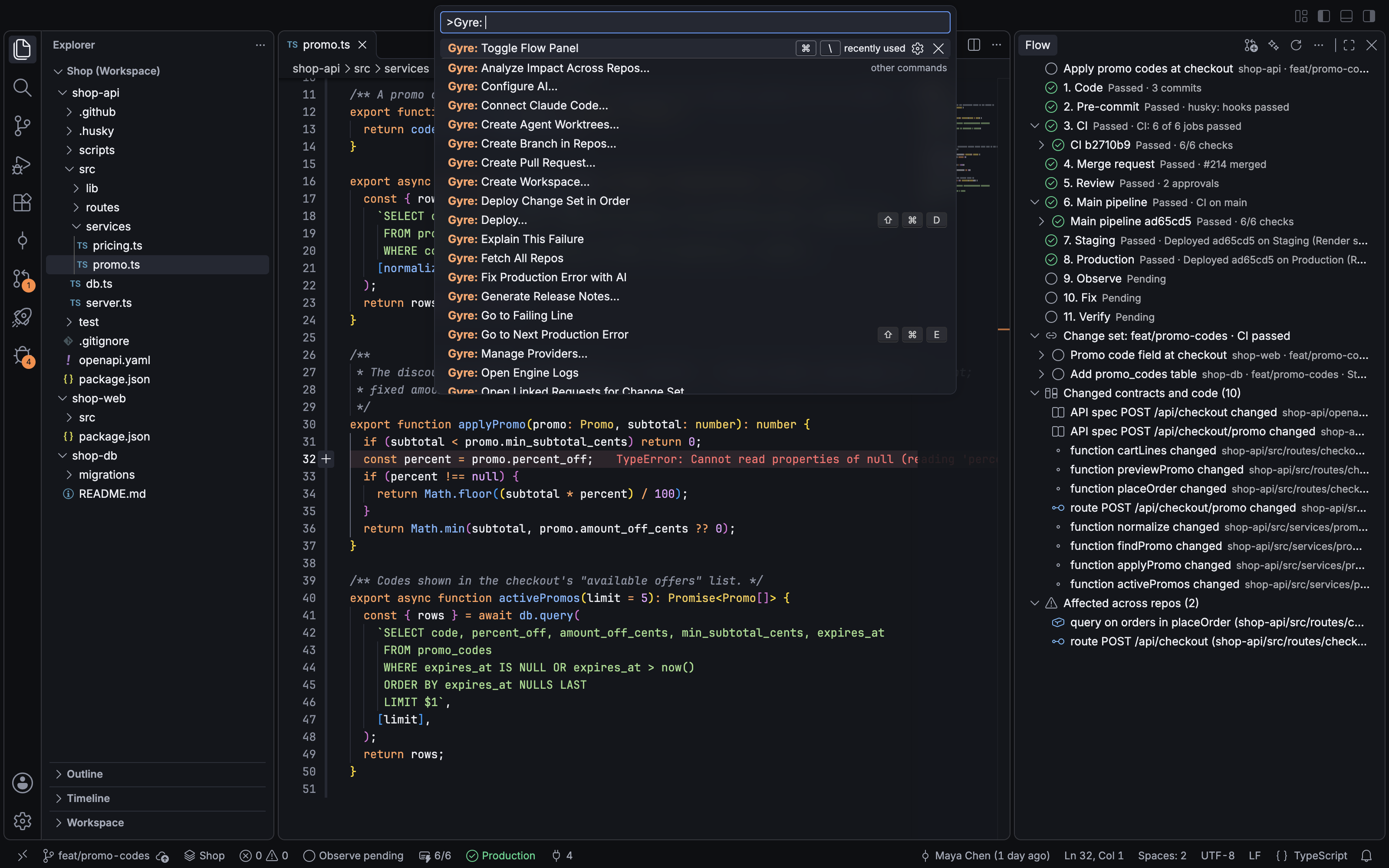
Promote, roll back, approve, rerun a job, open the failing line. The command palette reaches every stage and opens in 14 ms.

The command palette filtered to Gyre actions: analyze impact, review with AI, deploy, fix production error with AI

Works with what you already run.

Gyre connects to your existing code host, CI, deploy platform and error tracker. No migration and no new pipeline to maintain.

  • GitHubCode host, reviews
  • GitLabCode host, reviews
  • GitHub ActionsCI
  • GitLab CICI
  • RenderDeploys, logs
  • HelmKubernetes deploys
  • Argo CDKubernetes deploys
  • SentryErrors
  • Platform logsErrors, no setup
  • pre-commitLocal hooks
  • HuskyLocal hooks
  • LefthookLocal hooks
  • AnthropicAI, your key
  • OpenAIAI, your key
  • Claude CodeAI, your CLI
  • OpenID ConnectSingle sign-on

Planned next: Vercel, Railway, Fly, Datadog, OpenTelemetry, Bitbucket, Jira, Linear.

One loop for the whole team.

Join a team and your teammates' commits, reviews, pipelines and deploys arrive on the same timeline, live. Use Gyre Cloud or run Gyre Server yourself.

Gyre Cloud

Hosted for you. Join with an invite code or single sign-on.

Gyre: Join Team
Server https://api.gyreapp.io
Invite from Invite Teammate, or single sign-on

Gyre Server

The same server inside your network, with your Postgres and your key.

Self-hostedDocker Compose or Helm
$ docker compose up -d
$ helm install gyre ./gyre

Shared timelines

Teammates' events land on your change within seconds, over a long-poll.

Webhooks

GitHub, GitLab, Render and Sentry deliveries replace polling, signatures verified.

Team tokens

An admin shares one code-host token, sealed on the server and never returned.

Single sign-on

OpenID Connect with your identity provider, bound to the device that signs in.

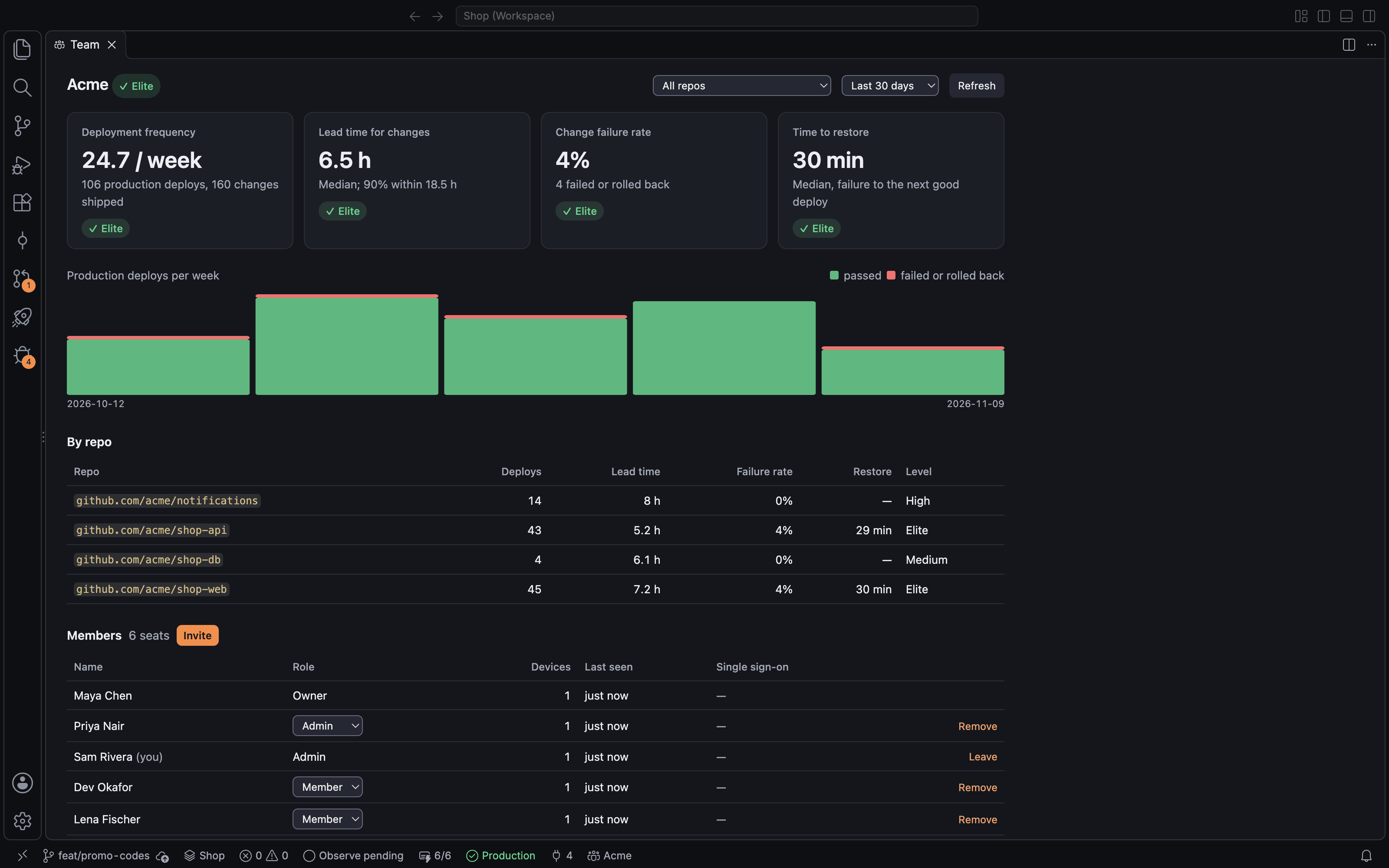
Team analyticsIn the IDE
Sample data, last 30 days
Deployment frequency26.8per weekImproved 2%
Lead time for changes7.0hoursImproved 5%
Change failure rate4.0%Improved 17%
Time to restore29minImproved 19%
The Team dashboard in Gyre: deployment frequency, lead time, change failure rate and time to restore, deploys per week, measures per repo, and members

Your code stays on your machine.

Gyre's engine runs locally. Nothing leaves your computer unless a feature you use needs it, and then you see exactly what.

Read how Gyre handles your code and keys

  • A local engine

    Indexing, log parsing, stack-trace mapping and AI orchestration run in gyred, on your computer.

  • Keys in your OS keychain

    Tokens live in Keychain, Credential Manager or Secret Service, and can never be read back.

  • AI only when you send it

    Every AI request shows its exact text and destination first, and goes to your own provider.

  • Teams share metadata, not code

    Team sync sends branch names, commit ids and stage events. Your source never syncs.

Free on your machine. Paid when you share.

The whole loop is free for one developer. Teams pay for the shared timeline.

Billing period

Free

$0forever

For individuals. The whole loop, on your machine.

  • The full 11-stage loop: code, checks, review, deploy, production errors, fix and verify
  • Every connector: git hosts, CI, deploy targets and error trackers
  • Bring your own AI model or keys
  • The mobile app, plus remote control of your own computersComing soon
  • 30 days of timeline history
  • Fine at work for your own workflow; sharing with teammates needs a paid plan
  • Community support
Download Gyre

Team

$20per user / month, billed annually

One shared timeline for the whole team.

Everything in Free, plus:

  • Shared timelines: everyone sees every change's status
  • Team connections: company repos, shared deploy targets, shared Sentry
  • Real-time updates instead of periodic checks
  • A team review inbox
  • Basic deploy approvals, such as one approver for production
  • Approve and roll back from the mobile app, with Face IDComing soon
  • 90 days of history and email support
Start a team

Business

Most popular
$40per user / month, billed annually

Delivery metrics, deploy rules and single sign-on.

Everything in Team, plus:

  • Delivery metrics: how fast and how safely the team ships, with no separate analytics tool
  • Advanced deploy rules: multiple approvers, deploy time windows, per-environment rules
  • Audit logs of every deploy, rollback, approval and remote commandComing soon
  • Single sign-on (SSO), not held back for Enterprise
  • Admin controls for what is allowed from mobileComing soon
  • 1 year of history and priority support
Start a 14-day trial

Enterprise

Customabout $60 per user / month, 50-seat minimum

Self-hosted or dedicated, from 50 seats.

Everything in Business, plus:

  • Self-hosted Gyre Server, or a dedicated cloud
  • Automatic user provisioning (SCIM)Coming soon
  • Data residency and custom retentionComing soon
  • An uptime guarantee (SLA)
  • Dedicated onboarding, support and custom connectors
  • Security reviews and custom contract terms
Contact sales

Add-on: Gyre AI creditsComing soon

For teams that would rather not manage their own model keys. Usage-based, at model cost plus a margin.

  • You pay only for developers active in the last 30 days: no idle seats.
  • Annual billing saves 20%.
  • Every new organization gets a 14-day Business trial, then returns to Free.
  • Open-source maintainers and students get Team for free.
  • Early-stage startups get 50% off the first year.

Prices in US dollars, before tax.

Take a change all the way around.

Open a repo, push a branch and watch its timeline fill in.

Download for macOS

Also for Windows and Linux.